OpenStitch
Clone of Brother PE-DESIGN
Free, open-source embroidery software for macOS, Windows and Linux that opens and saves Brother PE-DESIGN 11 files. In alpha.
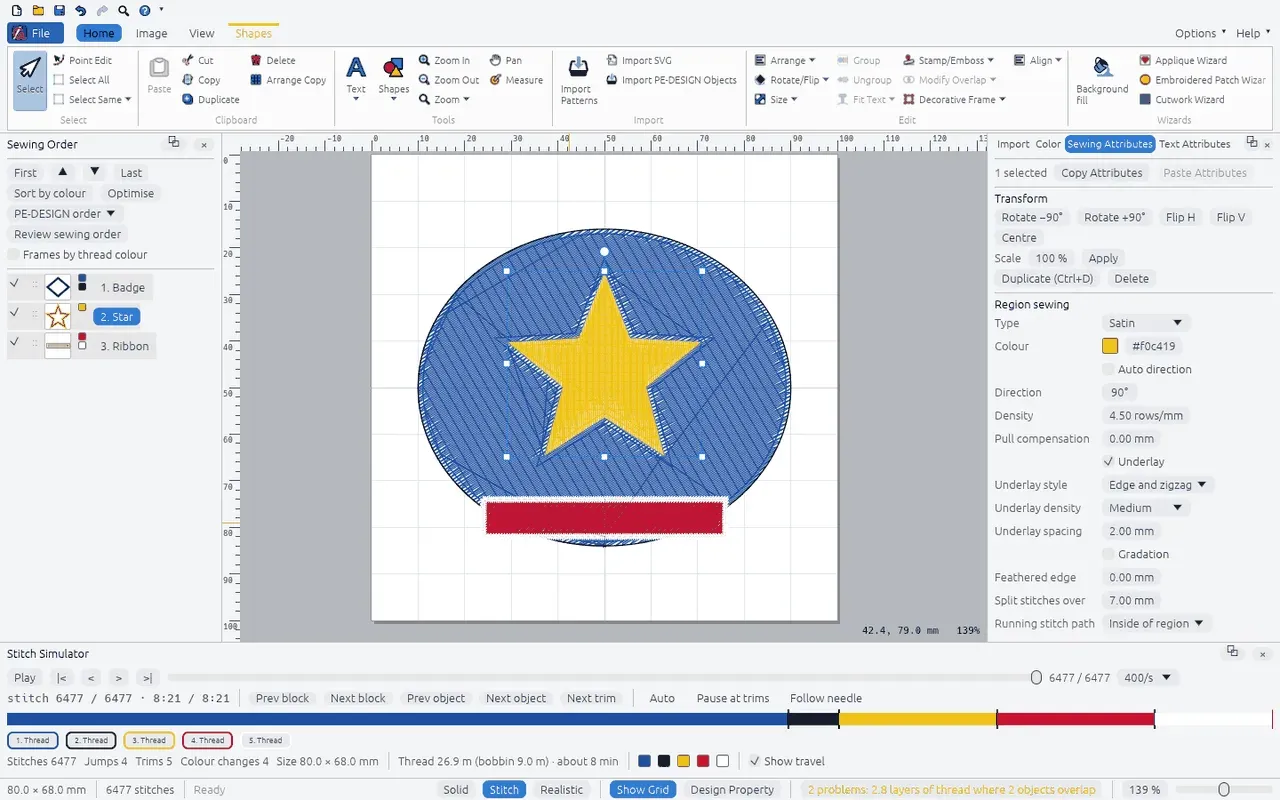
Image: OpenStitch
What works the same as Brother PE-DESIGN
- An application menu, a quick access toolbar and a ribbon with Home, Image, View and Shapes tabs, a Sewing Order panel on the left, the design page in the middle, sewing attributes on the right and a stitch simulator below.
- Reads every PES version and saves designs that open in PE-DESIGN 11 with their shapes and text still editable.
- Region and line sew types, lettering with Text Transform, Manual Punch, and appliqué, patch and cutwork wizards.
- Image to embroidery in a mode compatible with PE-DESIGN.
What is missing
- It is an alpha: good for trying out and testing, not for production work. Do a test sew-out on scrap fabric first.
- Image digitizing is approximate: Auto Punch, Cross Stitch and Photo Stitch do not sew the same stitches as PE-DESIGN.
- Wireless transfer and Link are not available.
How to get started
- Open it in your browser at cristianonescu.github.io/OpenStitch, or take the Windows installer (.msi) or portable zip, the Mac app or the Linux AppImage from the latest release.
- The builds are not code-signed, so on Windows choose More info, then Run anyway in the SmartScreen prompt.
- Open a PES file with File, Open, or start a new design.
Compatible files
Brother PE-DESIGN files (.pes) According to the project